
Google added an “AI Assistant” channel to GA4 this year. If you’ve opened your acquisition reports lately and noticed a new bucket sitting alongside Organic Search and Referral, that’s it. It’s real, it’s free, and you didn’t have to do anything to get it.
It’s also, on its own, not enough. Not because Google did a bad job, but because of what a default channel group fundamentally is: a forward-looking, one-size-fits-everyone classification that starts the day it ships. If you actually want to understand how AI assistants are sending people to your site, including everything that happened before Google decided to name it, you’re going to have to build a little of that yourself.
The good news is that it’s not hard, the data’s already sitting in your property, and I’m going to walk you through both ways to do it: the Data Studio version I use in client dashboards, and the native GA4 version for anyone who wants to stay inside Analytics. Screenshots for both.
First, what Google actually shipped
GA4’s AI Assistant default channel group went live on May 13, 2026, reaching broad availability a few weeks after that. When a session arrives with a referrer Google recognizes as an AI assistant, three things happen automatically: the medium becomes ai-assistant, the session groups under “AI Assistant” in your Default Channel Group reports, and the campaign gets labeled (ai-assistant). No setup, no tagging, no configuration.
As of Google’s published definition, the recognized list is five platforms: ChatGPT, Gemini, DeepSeek, Copilot, and Grok. Perplexity is not among them, so Perplexity sessions land in plain Referral. If your working assumption is “the AI Assistant channel equals my AI traffic,” that assumption is already wrong for one of the more widely used assistants out there.
And that list has already changed once. At launch in May, the platforms being named were ChatGPT, Gemini, and Claude. By June, the published definition had added DeepSeek, Copilot, and Grok, and Claude had dropped off it entirely. Same channel, roughly a month apart, different set of platforms. Nobody announced the change; you’d only know if you happened to check twice.
So when someone tells you what’s in the AI Assistant channel, the useful follow-up question is “as of when.” That’s not a knock on Google, a rollup like this has to move as the market moves. But it does mean the definition is a moving target you don’t control and won’t be notified about, which is worth sitting with for a second before you build reporting on top of it.
But the list isn’t the real limitation. These two are:
- It only works going forward. Nothing before May 13, 2026 gets reclassified. Every AI referral you earned before that date is still sitting in Referral, or Unassigned, or Direct, exactly where it landed at the time.
- A lot of AI-assisted traffic never carries a referrer at all. In-app browsers, native apps, copied-and-pasted links. Those sessions land in Direct and no channel definition, Google’s or yours, is going to pull them back out.
Google’s own AI Overviews are a separate matter entirely: those route to Organic Search, not to this channel. Which is arguably correct, but worth knowing if you were hoping one bucket would tell you the whole story.
Why I stopped waiting on this
I’ve been building AI referral classification into client dashboards for a while now, well before there was a native channel to react to. Not because I saw this coming, but because the need showed up in client conversations first: people wanted to know whether ChatGPT was sending them anyone, and “check the Referral report and squint” was not a satisfying answer.
Here’s the thing that makes this straightforward: GA4 has always collected Session source. The raw material for identifying AI referral traffic has been sitting in your property the entire time, whether or not Google ever got around to naming it. All you’re doing is putting a label on data you already have.
Google’s channel can only ever look forward from the day it launched. Your own classification looks back as far as your data retention allows, because it isn’t a new tag. It’s just a lens on a dimension you already had.
The Data Studio build, step by step
Quick naming note before we start, because it’s genuinely confusing: this tool was Data Studio, then Google renamed it Looker Studio for about three and a half years, then renamed it back to Data Studio on April 11, 2026. It’s Data Studio again. If you’ve had it filed in your head as Looker Studio, you’re not behind, Google just changed its mind.
Here’s the whole build. Seven steps, maybe ten minutes if you’re already connected to your GA4 property.
Step 1: Open your data sources
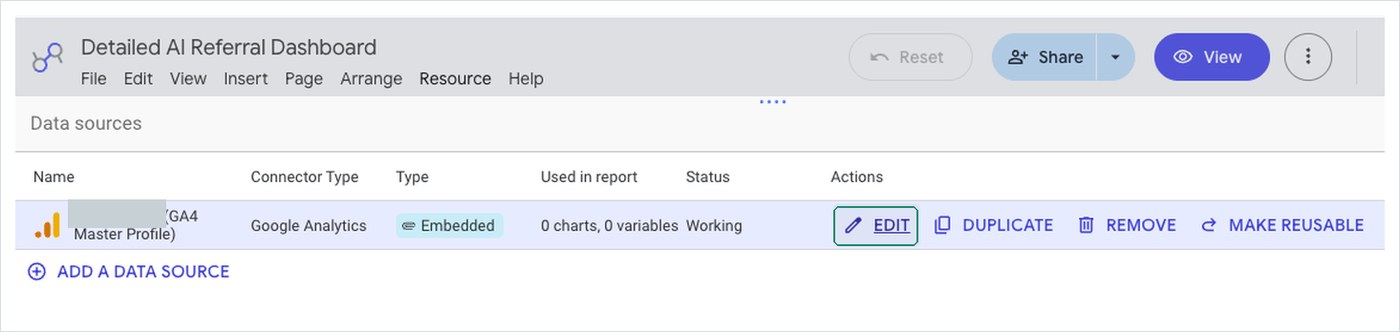
In your report, go to Resource → Manage added data sources. You’re heading for the GA4 connection itself, not a chart.

Step 2: Edit the GA4 data source
Find your GA4 property in the list and click EDIT. This opens the field editor, where you can add dimensions that don’t exist in GA4 itself.
Step 3: Add a calculated field
Top left, there’s an Add a field control. Choose Add calculated field.

Step 4: Name it and paste the formula
Give it a name you’ll recognize in a field picker six months from now. I use AI Platform. Then paste this into the formula box:
CASE
  WHEN REGEXP_CONTAINS(
    LOWER(Session source / medium),
    '(^|[.])(chatgpt[.]com|chat[.]openai[.]com)([ /]|$)'
  )
  THEN 'ChatGPT'
  WHEN REGEXP_CONTAINS(
    LOWER(Session source / medium),
    '(^|[.])(claude[.]ai|claude[.]com)([ /]|$)'
  )
  THEN 'Claude'
  WHEN REGEXP_CONTAINS(
    LOWER(Session source / medium),
    '(^|[.])perplexity[.]ai([ /]|$)'
  )
  THEN 'Perplexity'
  WHEN REGEXP_CONTAINS(
    LOWER(Session source / medium),
    '(^|[.])(gemini[.]google[.]com|bard[.]google[.]com)([ /]|$)'
  )
  THEN 'Google Gemini'
  WHEN REGEXP_CONTAINS(
    LOWER(Session source / medium),
    '(^|[.])copilot[.]microsoft[.]com([ /]|$)'
  )
  THEN 'Microsoft Copilot'
  WHEN REGEXP_CONTAINS(
    LOWER(Session source / medium),
    '(^|[.])meta[.]ai([ /]|$)'
  )
  THEN 'Meta AI'
  WHEN REGEXP_CONTAINS(
    LOWER(Session source / medium),
    '(^|[.])grok[.]com([ /]|$)'
  )
  THEN 'Grok'
  WHEN REGEXP_CONTAINS(
    LOWER(Session source / medium),
    '(^|[.])deepseek[.]com([ /]|$)'
  )
  THEN 'DeepSeek'
  WHEN REGEXP_CONTAINS(
    LOWER(Session source / medium),
    '(^|[.])chat[.]mistral[.]ai([ /]|$)'
  )
  THEN 'Mistral Vibe'
  WHEN REGEXP_CONTAINS(
    LOWER(Session source / medium),
    '(^|[.])poe[.]com([ /]|$)'
  )
  THEN 'Poe'
  WHEN REGEXP_CONTAINS(
    LOWER(Session source / medium),
    '(^|[.])you[.]com([ /]|$)'
  )
  THEN 'You.com'
  WHEN REGEXP_CONTAINS(
    LOWER(Session source / medium),
    '(^|[.])phind[.]com([ /]|$)'
  )
  THEN 'Phind'
  WHEN REGEXP_CONTAINS(
    LOWER(Session source / medium),
    '(^|[.])genspark[.]ai([ /]|$)'
  )
  THEN 'Genspark'
  WHEN REGEXP_CONTAINS(
    LOWER(Session source / medium),
    '(^|[.])iask[.]ai([ /]|$)'
  )
  THEN 'iAsk'
  WHEN REGEXP_CONTAINS(
    LOWER(Session source / medium),
    '(^|[.])andisearch[.]com([ /]|$)'
  )
  THEN 'Andi'
  WHEN REGEXP_CONTAINS(
    LOWER(Session source / medium),
    '(^|[.])felo[.]ai([ /]|$)'
  )
  THEN 'Felo'
  ELSE 'Other / Non-AI'
END
A few things worth understanding rather than just copying.
Why REGEXP_CONTAINS and not an exact match. Session source / medium comes through as a combined string like chatgpt.com / referral. An exact match would need you to predict every medium that might ever be paired with that source. Contains-with-a-pattern sidesteps that entirely.
Why [.] instead of \.. Both escape the dot. Square brackets survive copy-paste between tools without the backslash getting eaten, which saves a debugging session you don’t need.
Why the (^|[.]) at the front and ([ /]|$) at the end. These are boundaries. The front says “either this is the start of the string, or it’s preceded by a dot,” so chatgpt.com matches but notchatgpt.com doesn’t. The back says “either a space, a slash, or the end of the string,” which is what lets it match chatgpt.com / referral without also matching chatgpt.communitysite.org. Boundaries are the difference between a classification you can trust and one that quietly over-counts.
One aside on that Mistral Vibe line, because it makes the larger point better than I can: Mistral renamed its assistant from Le Chat to Vibe partway through 2026. A native platform list has to catch every rename, from every vendor, on someone else’s schedule, and then you have to notice that it did. A regex you own needs one edit whenever you spot it.
Step 5: Put it in a table
Drop your new AI Platform field in as the dimension, Sessions as the metric. This is the first moment it gets interesting, because you’re now looking at named platforms instead of a referral list.

Step 6 and 7: Filter out the noise
That “Other / Non-AI” row is going to be enormous and it’ll wreck every chart you build. Add a chart-level filter that excludes it.

The filter itself is one clause: Exclude · AI Platform · Equal to · Other / Non-AI. Name it something obvious, because you’ll reuse it on every chart in the report.

Now the part that actually makes the case
Here’s where I’d point anyone who’s on the fence about whether this is worth building. Add Session default channel group as a second dimension, right next to your AI Platform field. Same sessions, two classifications side by side: yours and Google’s.
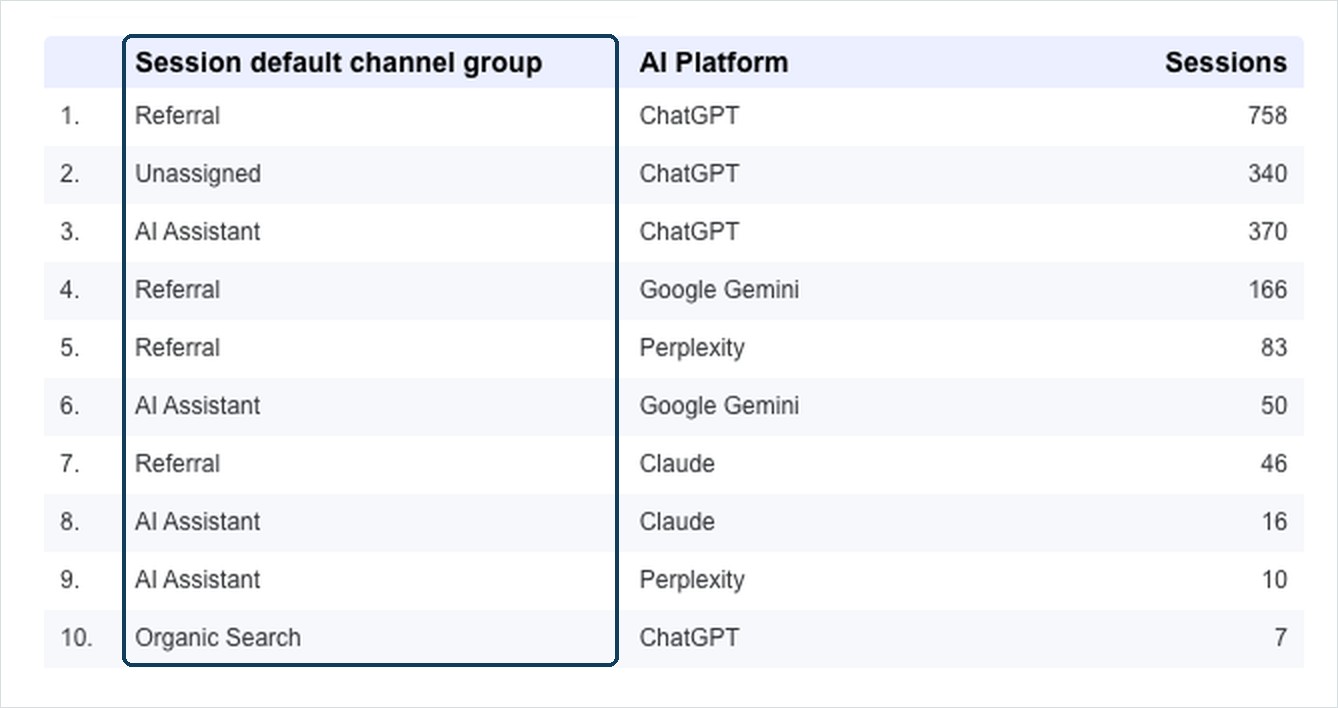
Look at what happens to ChatGPT. The same platform, correctly identified as one thing by the custom field, lands in four separate buckets in Google’s channel grouping: Referral, Unassigned, AI Assistant, and even a handful in Organic Search. Gemini splits across Referral and AI Assistant. So does Claude.
And then there’s Perplexity, which is the row I’d point at if I only got one. Perplexity is not in Google’s published AI Assistant definition. Every current write-up of that definition says the same thing: Perplexity traffic lands in Referral. Here it’s landing in both. Some of it in Referral, exactly as documented, and some of it in AI Assistant, which per the documentation shouldn’t be happening at all.
I can’t tell you with certainty why, and I’m not going to pretend otherwise. It could be that the classification is being expanded quietly, the way Claude was quietly dropped. It could be a subset of Perplexity sessions arriving with a referrer that resolves differently. What I can tell you is that the published definition and the actual behavior of my data don’t agree, and I’d never have known if I were only looking at the channel report.
Which is the argument for owning your own classification, made better by real data than I could make it in the abstract. The rollup is a moving target. The custom field is the fixed reference point you can measure the moving target against.
To be straight with you about what this does and doesn’t prove: a good portion of that split is simply the rollout date. Sessions that predate May 13, 2026 were never eligible for the AI Assistant label, so they stayed wherever they originally landed. That’s not Google getting it wrong, that’s the forward-only limitation doing exactly what it says on the tin.
But that is the point. This is what the historical gap actually looks like when you put it on screen. If you rely on the native channel alone, every one of those pre-May sessions is invisible to you as AI traffic, forever. The custom field goes back and finds them, because it’s reading a dimension GA4 was collecting the whole time.
The “Unassigned” rows deserve their own mention, too. Unassigned is GA4’s shrug: traffic it collected but couldn’t confidently sort. It’s usually worth a look regardless of what you’re investigating, and here it’s hiding real, identifiable AI referrals.
What you’re actually after: engagement quality
Drop the channel group dimension back out and add the metrics that matter. Average session duration, views per session, engagement rate.

This is the reason to do any of this. Session counts from AI assistants are still small for most sites, small enough that if volume were the only story, you’d reasonably ignore the whole category for another year. Engagement is a different story. When someone arrives from an AI assistant, they’ve usually already had the “is this the right kind of thing” conversation before they clicked. The assistant did the awareness-stage filtering. What lands on your page is a person who’s further along than a cold search click.
Check that against your own numbers before you believe it, including mine. There are some eye-catching “AI traffic converts X times better” stats going around right now without much methodology behind them, and your site is the only sample that matters for your decisions. But do look, because a channel with tiny volume and unusually strong engagement is exactly the kind of thing that gets dismissed on the volume number alone.
The same idea, natively in GA4
If you don’t have a Data Studio setup, or you just want this available inside Analytics itself, you can do a version of this natively. It’s more manual, and there’s one gotcha that will absolutely waste your afternoon if nobody warns you, so let me warn you.
Build a session segment
In Explore, create a new segment and choose Session segment. Session-scoped is what you want here: you’re describing how a visit arrived, not a property of the user or a single event.

Here’s the gotcha
Your instinct will be to reuse the same dimension and the same pattern from the Data Studio field. Session source / medium, matches regex, paste. Here’s what that gets you:

Zero. Not “a few,” not “fewer than expected.” Nothing.
Change one thing, the dimension, from Session source / medium to Session source:

The reason is worth internalizing, because it’ll come up again anywhere you move regex between GA4 and a reporting layer. Session source / medium is a combined value: chatgpt.com / referral. Session source is just chatgpt.com. An anchored pattern like this one:
^(chatgpt[.]com|chat[.]openai[.]com)$says “the entire value is exactly this and nothing else.” Against Session source, that’s true. Against Session source / medium, the value has / referral hanging off the end, so the $ never matches and you get nothing, silently, with no error to tell you why.
So the translation from the Data Studio field to a GA4 segment is two changes: switch the dimension to Session source, and swap the loose boundaries (^|[.]) and ([ /]|$) for hard anchors ^ and $. Cleaner pattern, because the dimension is cleaner.
Then repeat, one segment per platform, using the domains from the CASE statement above:
| Platform | Session source regex |
|---|---|
| ChatGPT | ^(chatgpt[.]com|chat[.]openai[.]com)$ |
| Claude | ^(claude[.]ai|claude[.]com)$ |
| Perplexity | ^perplexity[.]ai$ |
| Google Gemini | ^(gemini[.]google[.]com|bard[.]google[.]com)$ |
| Microsoft Copilot | ^copilot[.]microsoft[.]com$ |
| Meta AI | ^meta[.]ai$ |
| Grok | ^grok[.]com$ |
| DeepSeek | ^deepseek[.]com$ |
| Mistral Vibe | ^chat[.]mistral[.]ai$ |
| Poe | ^poe[.]com$ |
| You.com | ^you[.]com$ |
| Phind | ^phind[.]com$ |
| Genspark | ^genspark[.]ai$ |
| iAsk | ^iask[.]ai$ |
| Andi | ^andisearch[.]com$ |
| Felo | ^felo[.]ai$ |
Yes, that’s sixteen segments built one at a time. That’s the honest tradeoff, and it’s most of what I mean when I say the native route is more cumbersome.
What you get for the effort
Here’s where GA4 earns some credit back, because a saved segment is genuinely more useful than a Data Studio field in one specific way. Once it’s saved at property level, it shows up in the Segments list alongside Google’s own defaults, and it can be promoted into an audience.

That matters more than it might sound. An audience is forward-collecting and portable: it can follow people into remarketing, into comparisons, into other Google surfaces. A calculated field in a reporting layer describes what happened. An audience is a group you can actually do something with.
And of course you can apply the segment to an exploration, which is where the engagement analysis happens on the GA4 side.

So which one should you build?
Honestly, both, for different reasons. The Data Studio field is one object that classifies every platform at once, updates in one place, and is what you want if anyone other than you is going to look at this regularly. The GA4 segments are more work up front but they unlock audiences, and audiences are how measurement turns into activity.
If you only do one thing, do the Data Studio field first. It answers the question, and the answer will tell you whether the rest is worth your time.
What this actually surfaces
Getting the classification built is the boring part. The useful part is what you can do once AI referrals hold together as one thing and you can cut them by everything else. Three patterns come up often enough that I look for them on purpose now.
Content you weren’t treating as commercial. Cross your AI Platform field with landing page and key events, not just sessions. What tends to surface is a grouping nobody was watching: a documentation page, a comparison, an old FAQ, a glossary entry. Pages like that get cited because they answer a question cleanly, and the people who land on them convert at rates the page’s own history would never have predicted. Without the classification, those sessions sit scattered across Referral and Unassigned and the pattern never forms.
New users now, search referrals later. Split the same view by new versus returning. The first touch is often an AI assistant. The return visit comes through search, frequently branded. GA4 credits that second session to Organic Search, which is technically correct and strategically misleading, because the AI citation is what put you in the consideration set to begin with. Watching new versus returning across AI platforms is the closest you can get to seeing how an assistant shapes what someone searches for next, and that downstream search behavior is the part of personalization you actually have any leverage over.
Device tells you what kind of question it was. Break AI sessions out by device category. What I see, consistently enough to plan around, is that desktop AI sessions run longer and go deeper. That’s research mode: someone with a real problem and the time to work through it. Mobile AI traffic behaves differently, shorter and more answer-shaped, closer to quick recall or a fast fact check. Same channel, two genuinely different intents, and they want different things from the page they land on. Worth checking on your own property before you take my word for it, but it changes how you would prioritize a page once you see it.
None of that is visible in the AI Assistant channel report. It becomes visible the moment AI referrals stop being scattered and start being a dimension you can pivot on.
Which brings me back to something
I wrote a piece recently about using AI tools to find out where you actually stand rather than trying to perform for them. This is the other half of that.
Running prompts tells you whether assistants know who you are. This tells you what happens when the people they send actually arrive: which pages hold them, how long they stay, whether they go deeper. Put those two together and you stop guessing about AI visibility entirely. You know which platforms are citing you, which content earned it, and what those visitors did next. That’s a feedback loop, and it points directly at what to write more of.
Which is the whole point. Not measurement for its own sake, but knowing where the next piece of content needs to go.
This is most of what I do
I should be straight about where this article comes from: this is most of what I do, most days. Not AI referral classification specifically, but analytics and dashboard work like it, building and maintaining reporting that has to answer real questions for real people who are going to make decisions with it. The AI channel is just the newest version of a problem I have been working on for a long time, which is that the default report almost never answers the actual question.
So if the sixteen-segments section made you tired just reading it, that’s a fair reaction. It is real work, and it’s fiddly in the specific way that costs you an afternoon over one mistyped anchor. Everything above is genuinely DIY-able and I’d rather you have it than not. But there’s a difference between possible and worth your Saturday.
If you’d rather have it running than build it, that’s the Analytics, Audience & Content work: GA4 and Search Console validated, a clean branded dashboard on top, AI referrals classified properly instead of scattered across four channels, and the content, audience, and device cuts above already built in rather than left as an exercise. I can get it stood up quickly, and without the afternoon you would otherwise spend hunting for the typo.
Either way, if you build this yourself and something turns up you’d like a second, experienced set of eyes on, reach out. I’m happy to help you get through it, or to just build it for you.